Profit Margin Calculator

Enter your cost and selling price to calculate gross profit, profit margin and markup. Or enter a cost and a target margin to find the selling price you need.

Free · No sign-up Business & Finance
See total profit for a batch or month.

Results

Profit margin
–
–Gross profit / unit
–Markup
–Selling price
–Total profit

Enter a cost and price to see your margin.

How to use the Profit Margin Calculator

  1. Choose “From cost & price” or “Price for target margin”.
  2. Enter your cost and either the selling price or the margin you want.
  3. Review profit, margin and the equivalent markup.

Examples

A product costs $60 and sells for $100: gross profit is $40, profit margin is 40% and markup is 66.67%.

To earn a 30% margin on an item costing $70, the selling price must be $70 ÷ (1 − 0.30) = $100.

How it works

  • Gross profit = Price − Cost
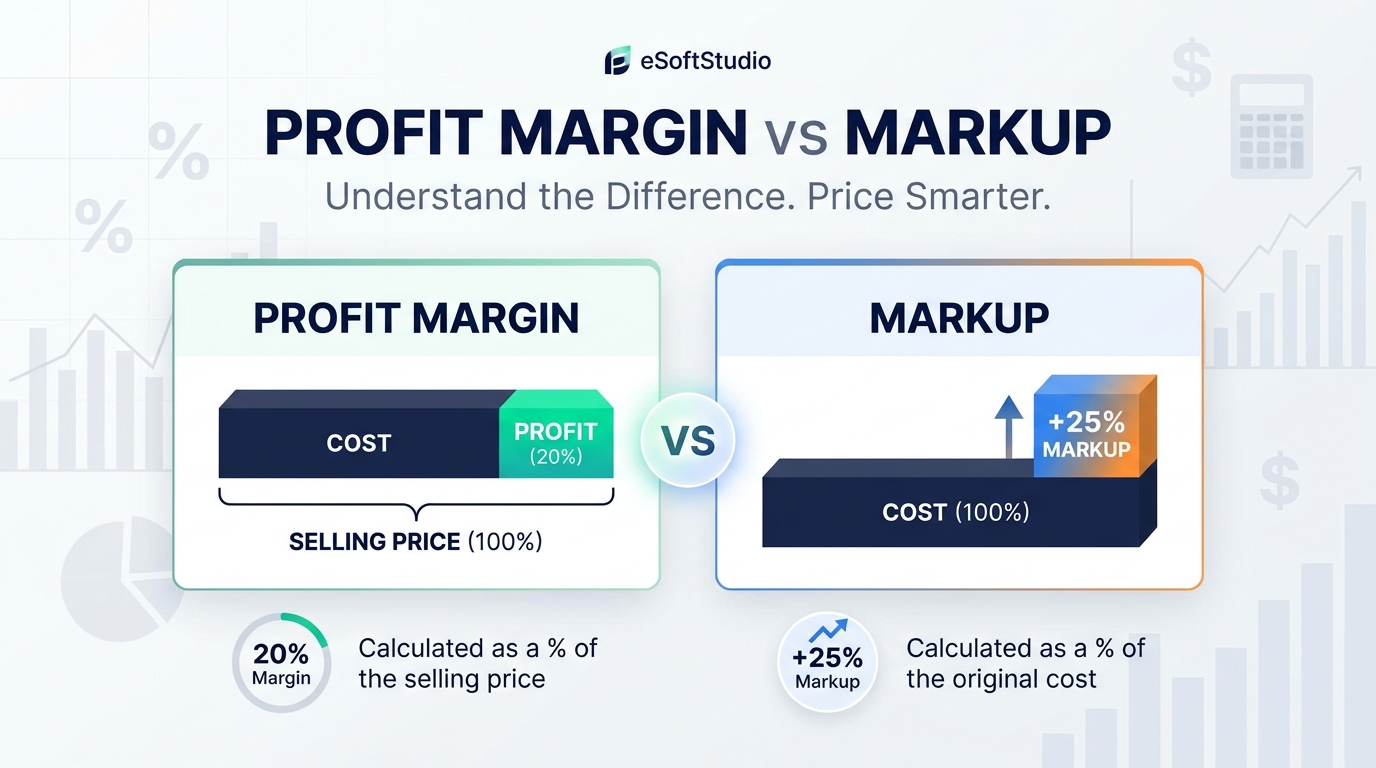
  • Profit margin = Gross profit ÷ Price × 100
  • Markup = Gross profit ÷ Cost × 100
  • Price for target margin = Cost ÷ (1 − Margin ÷ 100)

Margin is measured against revenue, markup against cost, so the same deal always shows a higher markup than margin. This calculator measures gross margin on a single item; net margin also subtracts overheads, interest and taxes.

Frequently asked questions

What is a good profit margin?
It varies widely by industry. Software and services often have high gross margins, while grocery and retail run on thin margins. Compare against businesses in your own sector.
Can margin be more than 100%?
No. Margin is profit as a share of price, so it can approach but never exceed 100%. Markup, however, can exceed 100%.

Related guides